Pixel Film Studios today introduces Pixelock, a new kind of video stabilizer for Mac. Where every other stabilizer tries to steady the whole frame, Pixelock does something categorically different: it identifies a specific subject in a clip — a face, a product, a logo, a vehicle — and keeps that subject locked to a fixed point on screen while the world moves naturally around it.
Traditional stabilization is a blunt instrument. It analyzes the entire image, estimates the average camera motion, and applies a blanket correction. The result is a steadier frame — but a moving subject still drifts, because nobody told the tool what to care about. Pixelock changes the premise entirely. You choose what matters. The software locks onto it. The camera's shake becomes irrelevant.
Powered by the Same AI as Face ID and iPhone Cinematic Mode
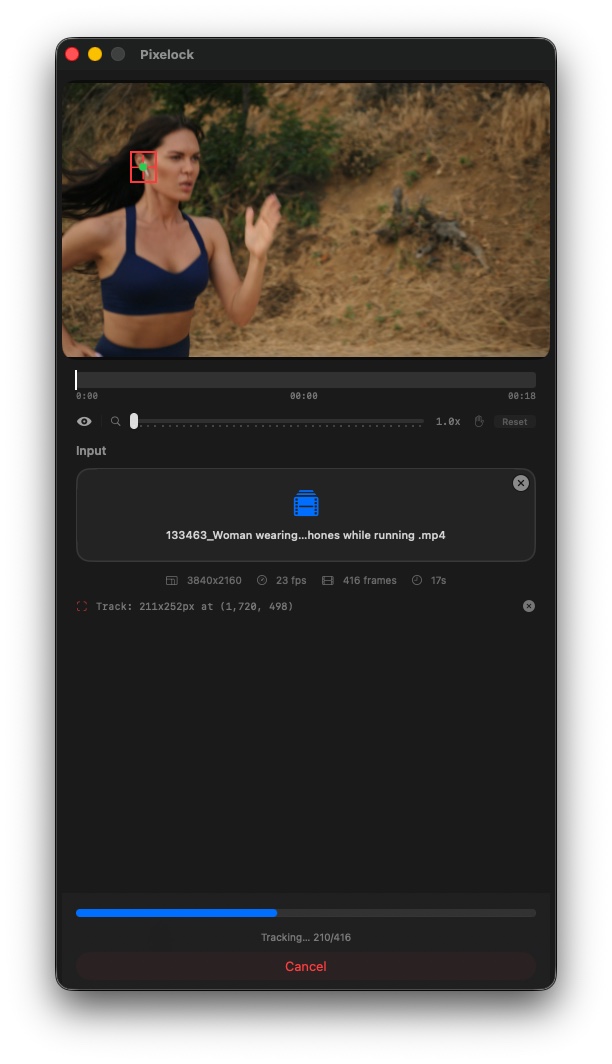
Pixelock is built on Apple's Vision framework — the same on-device AI stack that powers Face ID, iPhone Cinematic Mode, and the Neural Engine in every Apple Silicon Mac. Specifically, Pixelock uses two Vision algorithms in tandem:
- VNTrackObjectRequest — Apple's object tracking algorithm, which follows your subject's exact position across every frame of a clip with sub-pixel accuracy.
- VNGenerateOpticalFlowRequest — a dense per-pixel motion analysis that maps the rotational component of camera movement when Lock Rotation is enabled. The same technique used in professional motion tracking software, now available in a single click.
On Apple Silicon (M1 and later), both algorithms run on the dedicated Neural Engine. Analysis that would take minutes elsewhere completes in seconds.
Four Axis Controls. Three Independent Smoothing Sliders.
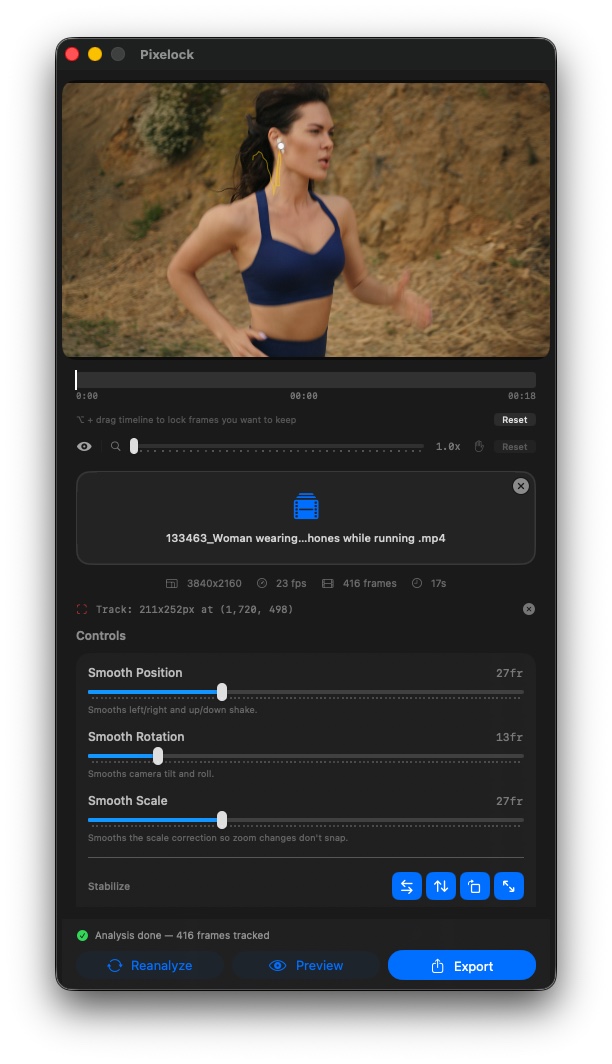
After analysis, Pixelock gives editors precise, per-axis control over every dimension of correction — something no other consumer stabilizer offers:
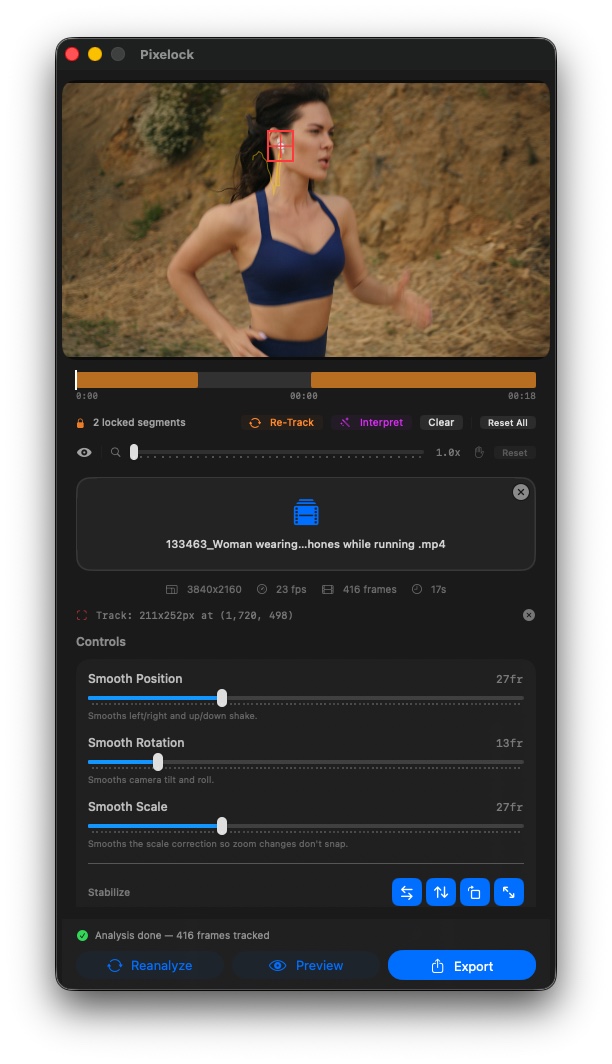
- Lock Horizontal — eliminates left-right camera drift and panning shake.
- Lock Vertical — removes up-and-down bounce from walking shots, handheld wobble, and respiratory camera movement.
- Lock Rotation — corrects camera roll. Horizon tilt, hand wobble, and accidental rotation are measured via optical flow and counter-rotated frame-by-frame.
- Lock Scale — corrects lens breathing. When a lens subtly zooms as it focuses — a known artifact of nearly every camera lens — Lock Scale detects it and keeps the tracked subject the exact same apparent size in every frame. No other consumer stabilizer does this.
Each axis has its own independent smoothing slider, so editors can tune position, rotation, and scale independently. A perfectly locked position with a touch of natural rotation. Rock-solid scale with fluid, organic camera movement. The creative control belongs to the editor, not to an algorithm guessing at intent.
Mirror Fill — Not Zoom-to-Fill
When stabilization shifts the frame, the edges need to be filled with something. Traditional stabilizers zoom the image in until the shaky edges disappear — destroying resolution in the process. Pixelock uses seamless 3×3 mirror fill instead: exposed edges are filled with a mirror reflection of the adjacent footage, seamlessly tiled. The output video is always the same pixel dimensions as the source. Zero resolution loss. Zero visible seam.
One GPU Pass. No Quality Loss.
Position correction, rotation correction, and scale correction are computed separately — then fused into a single CGAffineTransform and executed in one GPU pass using Metal and Core Image. There are no intermediate export steps, no repeated encode-decode cycles, no accumulated compression artifacts. The stabilized output is as clean as the original footage.
After analysis, Pixelock pre-caches every frame using a two-phase thumbnail system: coarse coverage of the full clip loads in under a second, and fine per-frame detail fills in automatically. Scrubbing the timeline feels instant anywhere in the clip.
The Reference Frame Anchor
Before analysis, editors choose a reference frame — the frame in the clip where the subject looks exactly right. Pixelock treats that frame as the target state for the entire clip. Every other frame is corrected toward that position. The anchor frame itself is always rendered with zero correction, guaranteed. This approach minimizes the total amount of correction applied across the clip, which means less mirror fill at the edges and a more natural result.
Lock What Works. Fix What Doesn't.
When a subject moves off-screen, turns away from the camera, or gets occluded mid-clip, Pixelock gives editors surgical control over tracking segments. Sections of the timeline that tracked cleanly can be locked in place. Problem segments can be re-tracked from a new reference position, or interpolated between two locked anchor points. The result is a clean, unbroken stabilization path across the full length of the clip — even when the subject disappears and returns.
Before/After Comparison Built In
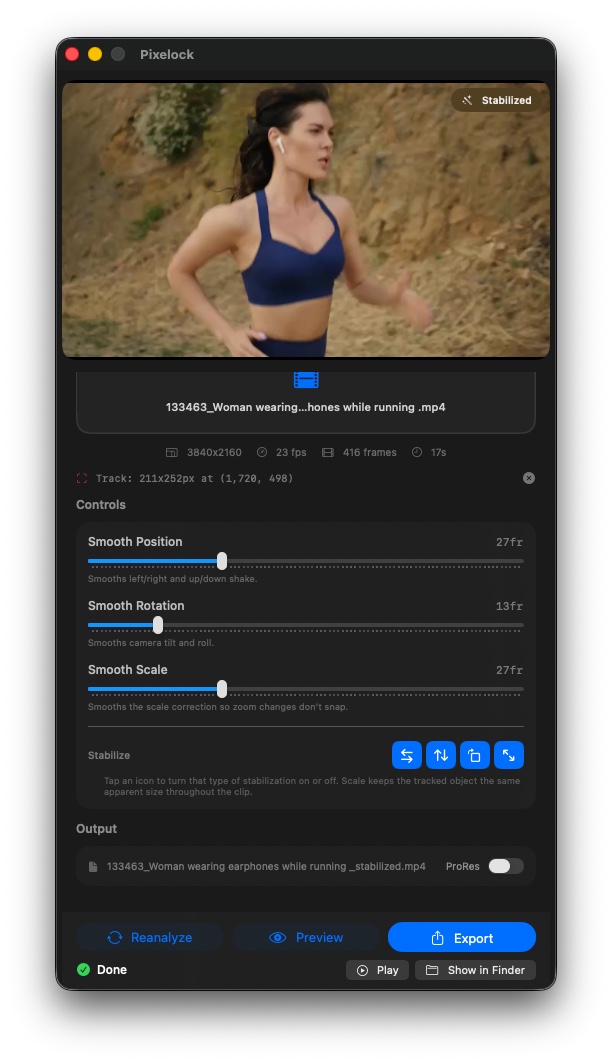
A Stabilized/Original toggle in the viewer switches between the processed output and the raw original footage at any scrub position. Editors can compare the result frame-by-frame before committing to an export — or use the comparison to show clients the transformation.
Built for Every Video Professional
Pixelock is useful anywhere a specific subject needs to be the fixed point of a shot:
- Wedding and event videographers — lock onto a couple's faces during a ceremony walk and deliver broadcast-quality footage from a handheld or shoulder-rig shot.
- Content creators and YouTubers — eliminate subtle drift from talking-head videos shot without a tripod, making the face the anchor point and the focus of every frame.
- Product and commercial videographers — lock a product to screen center with pixel-perfect precision. Lock Scale keeps apparent size consistent even when the camera moved slightly closer or farther between takes.
- Sports and action — track an athlete or vehicle with high smoothing for a broadcast-style floating lock, or lower smoothing to let the energy of the motion come through while removing jitter.
- Documentary and journalism — transform interview footage shot in the field with no tripod into polished footage that looks like a controlled studio environment.
- Film and television — fix a drifted gimbal shot, correct lens breathing, or recover when an actor moved off-mark. ProRes 422 output integrates directly into Final Cut Pro, DaVinci Resolve, and Adobe Premiere.
"Every stabilizer on the market answers the same question: 'how do I steady this shot?' Pixelock answers a different question: 'what matters in this shot?' That distinction changes everything about how the tool works and what you can do with it. We built Pixelock because videographers deserve a tool that starts from the subject — not from the camera."
— Dave Austin, CEO, Pixel Film Studios
100% On-Device. Zero Cloud. Zero Subscription.
Every computation in Pixelock runs on the local Mac. No video is uploaded. No account is required. No internet connection is needed during analysis or export. Zero telemetry is collected. Zero data leaves the machine. Pixelock is code-signed and notarized by Apple.
System Requirements and Output
- macOS Ventura 13.0 or later
- Universal Binary — Apple Silicon (M1 or later) and Intel
- Input: all macOS-compatible video formats (MP4, MOV, and more)
- Output: H.264 MP4 or Apple ProRes 422 MOV — always matches source resolution
- Audio preserved from source with frame-accurate sync
- Single User license, up to 3 Macs
- No Final Cut Pro required — Pixelock is a standalone macOS application
Availability and Pricing
Pixelock is available now at pixelfilmstudios.com for $29.95 as a one-time purchase with free lifetime updates. No subscription. No recurring fee.
About Pixel Film Studios
Founded in 2011, Pixel Film Studios is the leading developer of professional visual effects, titles, transitions, and generators built exclusively for Apple Final Cut Pro and Motion. Over the past 14 years, the company has shipped more than 2,000 products and fulfilled millions of orders for video editors, content creators, broadcast designers, and post-production professionals in over 100 countries. Learn more at pixelfilmstudios.com.
Press Contact
Colin Bauer
Director of Communications, Pixel Film Studios
[email protected]