Pixel Film Studios today introduces PixeLUT — a professional color-managed LUT engine for Final Cut Pro built around 686 cinematic looks, a GPU parallel-blending stack that layers up to eight looks without compounding contrast, true camera color science across 16 input color spaces, and an AI skin detection and protection system powered by Apple Vision that finds every face in the frame and auto-tunes a protection mask so the grade never wrecks complexions. A live hover preview renders each look at full precision on the current frame before it is applied. Tonal zone controls let any look be dialed back selectively in the shadows, midtones, or highlights. Metal-accelerated. Sandboxed. Installs directly into Final Cut Pro and Motion. $49.95.
LUT management in Final Cut Pro has historically meant a dropdown list of cube files and a single opacity slider — a workflow that works for applying a single look to footage shot in the same color space the LUT was designed for. It breaks down quickly in practice: stacking multiple looks serially compounds their contrast curves into a result that is too dark, too contrasty, or simply wrong; applying a cinematic LUT designed for Rec.709 to log-encoded S-Log3 or HLG footage produces a desaturated, muddy mess; and nothing stops the grade from destroying skin tones. PixeLUT is built around solutions to all three of these problems simultaneously.

686 Looks: Original Grades and Film Stock Emulations
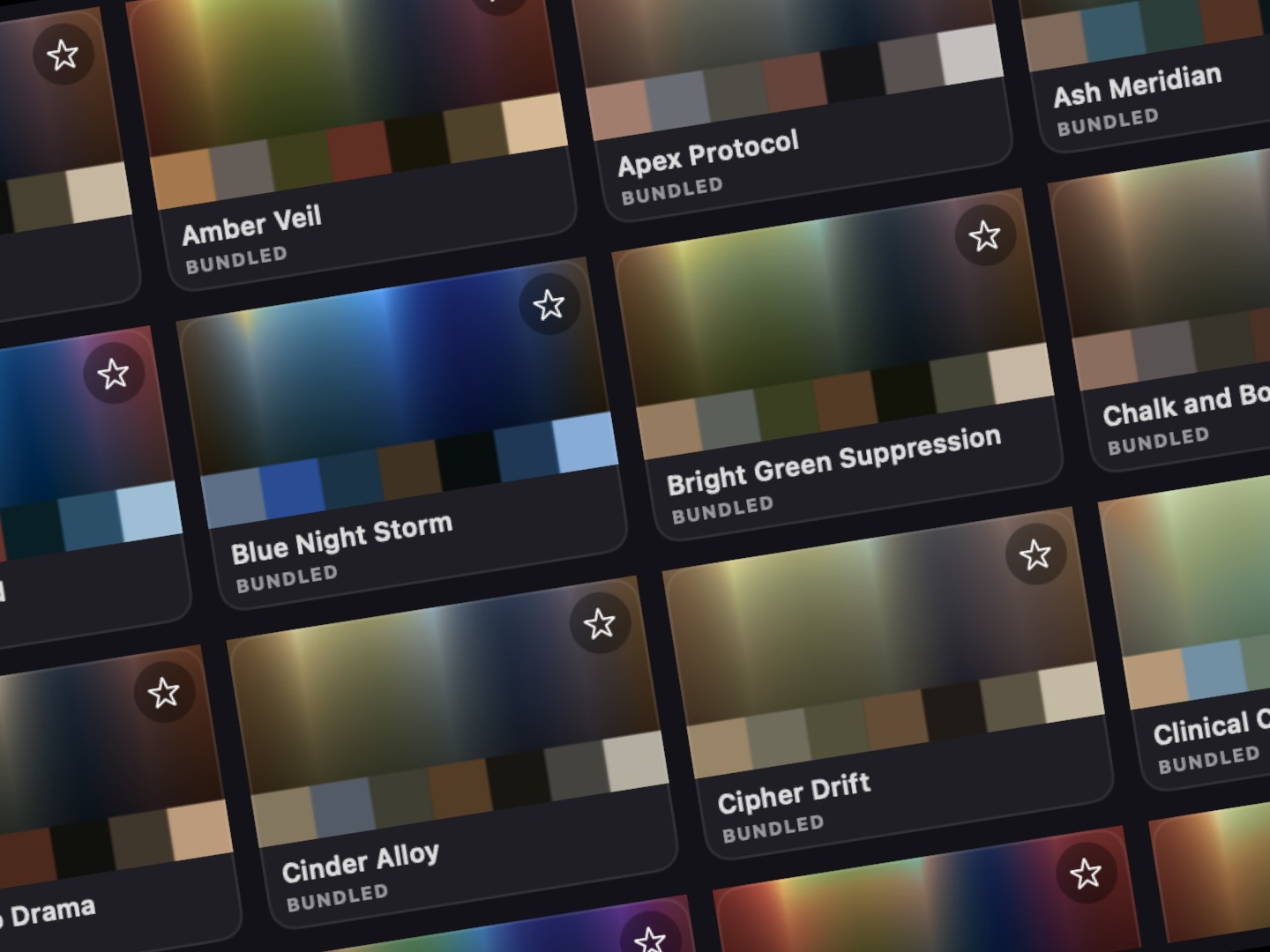
PixeLUT ships with 686 cinematic looks organized into two libraries. The first is 615 original graded looks spanning ten genre categories — Action, Drama, Horror, Thriller, Sci-Fi, Indie, and more — each designed to deliver a complete, coherent aesthetic from a single application. These are not generic contrast and saturation presets: they are finished color grades with specific shadow color, highlight rolloff, mid-tone hue shifts, and tonal characteristics that define the visual language of their genre.
The second library is 59 spectral emulations of real photographic and motion picture film stocks: Kodak Portra, Ektar, and Vision3 for the warm, organic response of Kodak's color science; Kodachrome for its distinctive saturated primaries and compressed shadows; Fuji Velvia and Provia for the cooler, more neutral character of Fuji's emulsion palette; Fuji Eterna for its cinema-specific exposure latitude; and print stocks that emulate the additional color transformation introduced when original camera negative is printed to release print. The spectral emulations are built from measured film response data, not from approximations — the grain structure, halation, and color response curves are modeled at the component level rather than eyeballed to look "filmy."
Every look in both libraries is searchable, can be marked as a favorite, and can be tagged with custom categories. The library browser renders a live hover preview of each look at full precision on the current frame — not a generic swatch generated at thumbnail resolution, but an actual rendering of that look on the specific frame the playhead is parked on. What the preview shows is exactly what applying the look will produce.
Parallel Blending: Eight Looks, No Muddiness
Serial LUT stacking — applying one look, then applying a second look to the result of the first — compounds their contrast curves. If the first look adds contrast and the second look also adds contrast, the result is more contrast than either look intended. Add a third and fourth look serially and the image collapses into shadow-crushed, highlight-clipped mud. This is the fundamental problem with stacking LUTs in a standard pipeline, and it is why most experienced colorists apply only one LUT at a time.
PixeLUT solves this with parallel blending. Instead of processing each look serially, PixeLUT applies all active looks to the original input independently and in parallel, then blends their outputs together at the set strengths. Combining two looks in parallel mixes their character — their color, their tonality, their film-specific response — without compounding their contrast. The result is a blend of the looks' identities, not a multiplication of their contrast curves. Eight look layers can be active simultaneously, each at its own strength, and the result remains clean, controlled, and true to the intended aesthetic of each look rather than the compounded distortion of stacking them serially.
AI Skin Detection and Protection
Color grades that look correct on the overall image often fail on human skin. The same orange push that gives an action film its warm, energetic look can make faces look sunburned. The teal lift that creates a cool, cinematic shadow can give skin a bruised, unhealthy cast. Correcting this traditionally requires secondary color qualifiers — isolating skin tone ranges by hue and saturation and applying corrections selectively — which adds significant time and expertise requirements to what should be a simple look application.
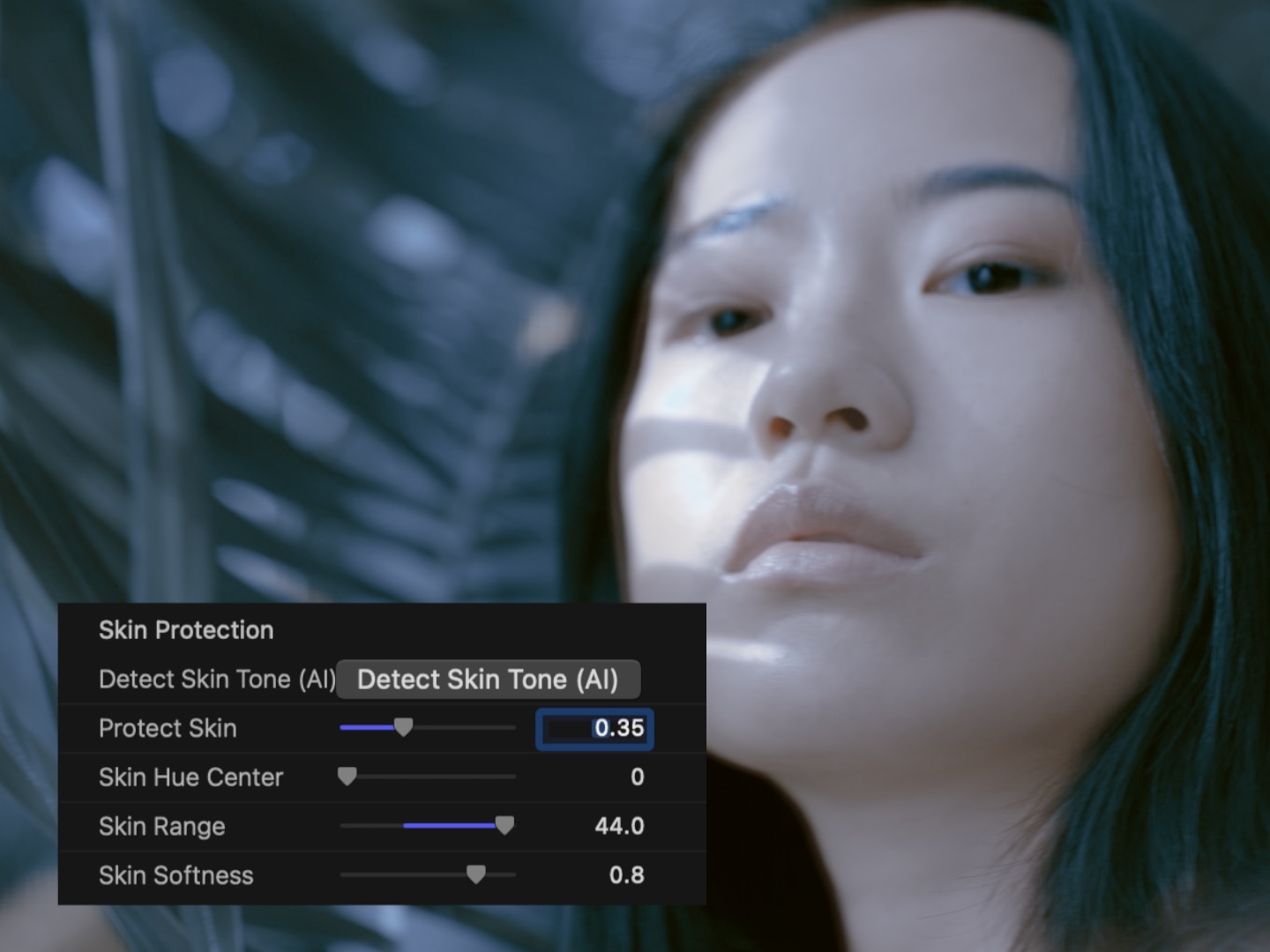
PixeLUT automates this with an AI skin detection system powered by Apple Vision. On activation, it finds every face in the frame — multiple faces, faces at different orientations, faces at different distances from camera. For each detected face, it samples the actual skin tone from multiple reference points: the forehead, cheeks, bridge, and nose. From those samples, it auto-tunes a protection mask that shields the detected skin regions from the full impact of the applied LUT grade. The protection is multi-face aware and orientation-aware — a face turned at a three-quarter angle is detected and protected as accurately as a frontal face. The grade applies to everything outside the protected regions at full strength; within the protected regions, the skin tone is preserved while the environmental color, background, and non-skin elements receive the full treatment.
16 Camera Color Spaces: True Color Science
A LUT designed for Rec.709 footage assumes the input signal has the tone curve and color primaries of standard dynamic range video. Applied directly to log-encoded footage — S-Log3, Log-C, BRAW, or any other camera log format — the LUT operates on an input that doesn't match its design assumptions, and the result is washed out and desaturated. The standard workaround is to apply a log-to-linear conversion before the LUT and a linear-to-output conversion after, adding additional nodes or effects to manage the color space transforms manually.
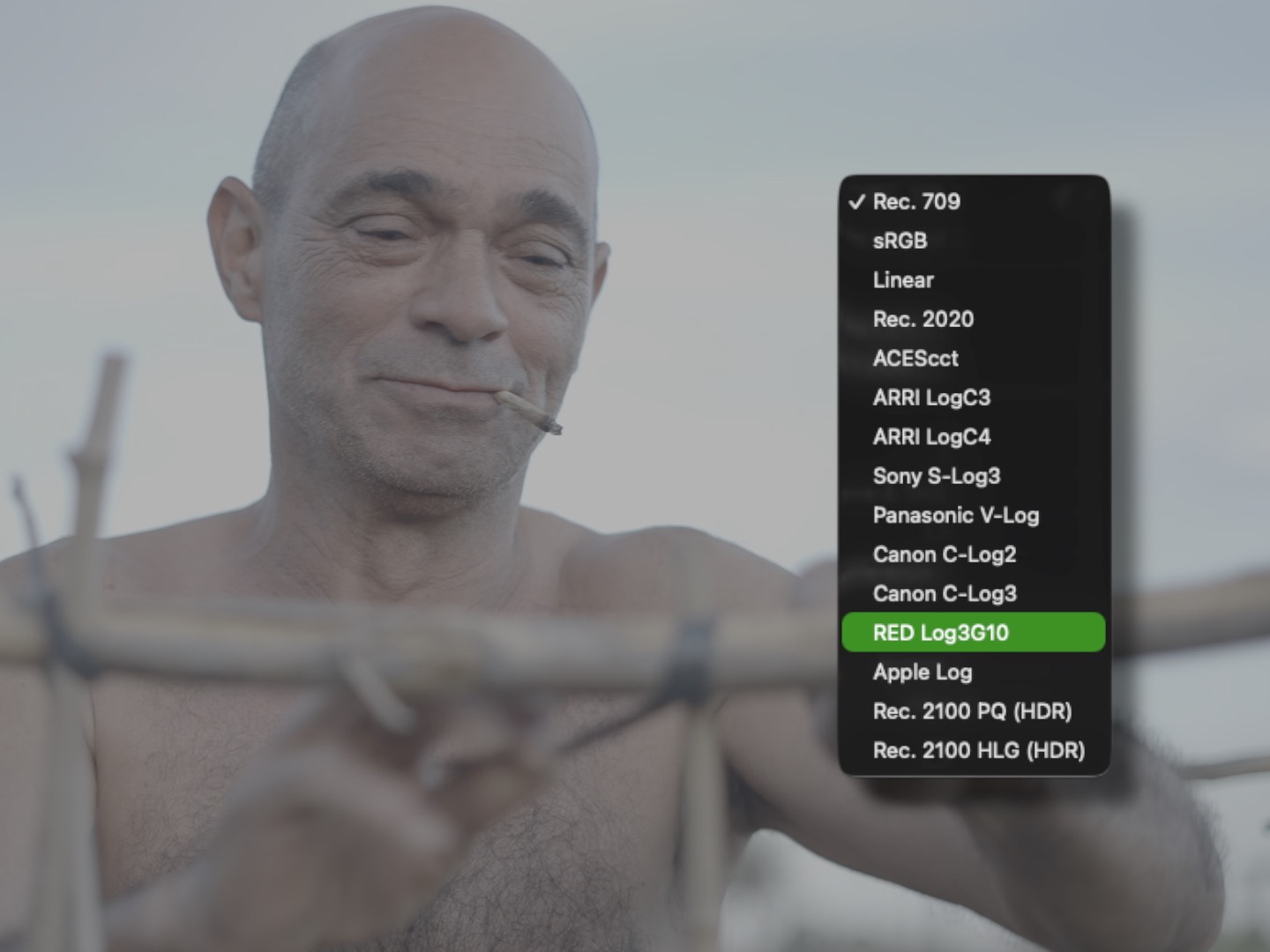
PixeLUT manages this automatically. Tell it what your footage is — Rec.709, S-Log3, Log-C, HLG, PQ, or any of 16 supported camera color spaces — and PixeLUT normalizes the input into the domain the LUT was designed for before applying the look, then converts the output to the target color space after. The same look applied to Sony S-Log3 footage and Rec.709 footage produces visually identical results. Camera-specific input transforms are built in for the 16 most common cinema and broadcast color spaces — no manual node insertion, no separate transform plugins, no lookup tables for color space pairs.
Tonal Zone Controls and Live Preview
After a look is selected, tonal zone controls let it be applied selectively to specific luminance ranges. The shadows, midtones, and highlights can each receive a different amount of the look — from full application to complete bypass — using a partition-of-unity weighting that ensures the transitions between zones are mathematically smooth and free of banding. Protect the toe from the look's shadow lift. Tame an aggressive highlight rolloff in just the bright regions. Apply the full grade only to the midtones where it reads most naturally. These adjustments are available on every look in the library, without requiring any secondary grading infrastructure outside PixeLUT.
"We built PixeLUT around the three things that actually break down when you try to use LUTs seriously in Final Cut Pro — stacking that goes muddy, looks that fail on mixed-format footage, and grades that wreck skin. Parallel blending, real camera color science, and AI skin protection. Plus 686 looks that are actually good. That's the product we wanted to exist, and now it does."
— Dave Austin, Founder & CEO, Pixel Film Studios
Metal GPU Acceleration. Sandboxed Architecture.
PixeLUT renders using Metal GPU acceleration. All look processing, layer blending, skin detection, and tonal zone weighting run on the GPU with no intermediate CPU steps — the full pipeline updates in real time as parameters change without pre-rendering. On Apple Silicon Macs, where Final Cut Pro and Metal share the same unified memory architecture, even eight active look layers process at full 4K resolution with no performance compromise.
The plugin runs in a sandboxed, out-of-process architecture. A sandboxed FxPlug plugin cannot crash the Final Cut Pro host — if the plugin process encounters an error, FCP continues operating normally. Editors working on deadline on complex projects don't have to choose between stability and a color-managed LUT pipeline.
Availability and Pricing
PixeLUT is available today at pixelfilmstudios.com for $49.95. One-time purchase, no subscription. Requires macOS Ventura 13.0 or later and Final Cut Pro 10.8 or later. Universal binary — native Apple Silicon and Intel. Installs into both Final Cut Pro and Motion simultaneously. Available via the PFS Installer app or by manual download from the customer account page.
About Pixel Film Studios
Founded in 2011, Pixel Film Studios is the leading developer of professional visual effects, titles, transitions, and generators built exclusively for Apple Final Cut Pro and Motion. Over the past 14 years, the company has shipped more than 2,000 products and fulfilled millions of orders for video editors, content creators, broadcast designers, and post-production professionals in over 100 countries. Learn more at pixelfilmstudios.com.
Press Contact
Colin Bauer
Director of Communications, Pixel Film Studios
[email protected]